


Bank of America Events
3.940.00 Reviews
App Specs
- Version
- 10.21.3 (1.124.0)
- Updated On
- License
- Free
- Downloads
- 100,000+
- Developer
- Bank of America
- Categories
- Events
- Platform
- Android, iOS
Screenshots

 Analysis by AppCompare
When I plan to attend an event with someone from my household, I find it helpful to treat the phone as a personal event notebook rather than a shared account. The Bank of America Events app is meant for people attending Bank of America events, so its most useful role is keeping each attendee’s schedule and event details close at hand. That makes it a different kind of download from a general calendar or a banking app, and it is worth understanding that distinction before you set it up.
A companion for the person attending
Picture a weekday morning when two people in a household are heading to the same conference but have different sessions to attend. One person can use the app to keep track of their own agenda, while the other checks their schedule separately. This is a more sensible approach than passing one phone back and forth: event plans can be personal, and the app is designed around an attendee’s experience rather than household management.
For coordination, I would use the app alongside a shared calendar or a quick conversation about meeting points. The event app can help an attendee organize sessions and connect with other participants, but it should not be treated as the household’s central planning tool. A practical division is to keep session choices in the app and use a calendar everyone already shares for travel timing, pickup plans, or other arrangements.
Set clear account boundaries
Because this is an event app from Bank of America, I would avoid assuming that it behaves like a public event directory that everyone can browse without an individual setup. The original experience describes registration or signing in, so before an event I would make sure the intended attendee can access their own account and event information. If another household member borrows the device, sign out or hand the phone over only when you are comfortable with what is visible.
That distinction matters especially when a phone is shared. An event schedule may reveal where someone plans to be, while attendee profiles and messages are personal interactions. I would not leave a device unlocked and open to those areas simply because the app is not for banking transactions. Keeping each attendee’s login and conversations private is a straightforward way to avoid confusion and protect personal boundaries.
Age, trust, and the right expectations
The app is listed for Everyone, but that rating is not the same as a recommendation for every child to use it independently. Its purpose is attending Bank of America events, and the networking tools described for attendees involve profiles, messages, and arranging meetings. For a younger person, I would have a parent or guardian decide whether the event context and those interactions are appropriate, and help with account setup where needed.
I also would not mistake this app for a place to handle personal finances. It is developed by Bank of America, but the focus is event participation, not checking balances or managing accounts. If your main goal is banking, use the bank’s banking tools instead; if your goal is to follow a public event calendar without attending, a general events source may be a better fit.
Worth Reading Before You Choose

EA SPORTS FC Mobile 26 Is a Bigger Football Game, but It Takes Time

Flipboard Shows What News Apps Must Do Beyond the Feed

Switching to Android Auto Means Rethinking Your Driving Routine

Google Calendar Makes a Crowded Week Easier to Manage

Ludo King Makes the Most of the Minutes Between Plans

Baby Panda World Brings Quick Play to Modern Phones, but Its Game Library Feels Busy
What’s the Buzz About?
First things first, the Bank of America Events app isn’t your average banking app. Instead of managing your finances, it offers a gateway to a plethora of financial events, conferences, and workshops spearheaded by Bank of America. Whether you're a finance professional or just someone with a keen interest in the industry, this app aims to keep you connected.
Getting Started
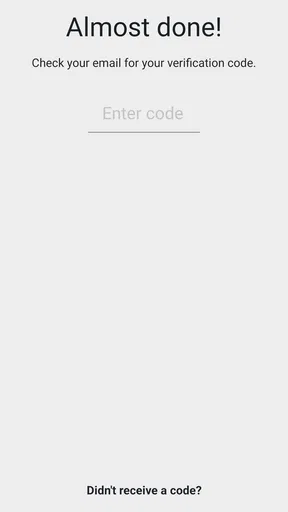
Downloading and setting up the app was a breeze. Available on both Android and iOS, you just need to search for it, hit download, and you’re on your way. Once installed, the registration process is quite straightforward. You can either create an account from scratch or log in using your existing Bank of America credentials. Easy peasy!
Features That Stand Out
The app is packed with a bunch of neat features that are designed to enrich your experience. Here are a few that caught my eye:
- Event Listings: The app provides a comprehensive list of upcoming events. You can filter these based on your interests, ensuring you only see what's relevant to you.
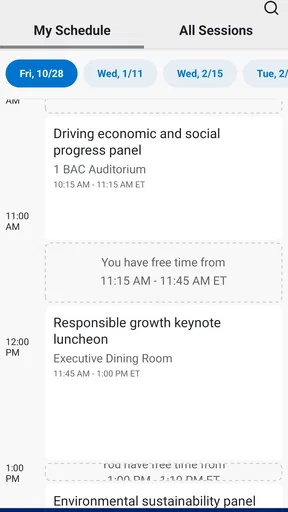
- Personalized Agenda: This feature allows you to create a personalized schedule. You can add sessions you’re interested in and get notifications so you don’t miss out.
- Networking Opportunities: The app provides a platform to connect with other attendees. You can view profiles, send messages, and even set up meetings. It’s like LinkedIn meets a conference room!
- Resource Center: Can’t make it to an event? No worries! The app has a resource center filled with recordings, presentations, and documents from past events.
Making the schedule work in practice
For a packed day, I would choose sessions in the personalized agenda before arriving, then use the resulting schedule as a quick reference between rooms. That is more useful than relying on memory or scrolling through every listing whenever a conversation runs long. Notifications can serve as reminders, but I would still check the agenda myself when plans change; a notification is a nudge, not a substitute for watching the clock or confirming where a session is held.
There is also a small but useful trade-off in filtering event listings. Narrowing the list to relevant subjects cuts down on noise, but I would scan the broader schedule once before settling on a plan. An unfamiliar session may turn out to be more valuable than the topic I initially expected. For anyone attending with a colleague or family member, compare schedules in advance and pick a meeting point outside the app rather than assuming both people will be free at the same time.
User Experience
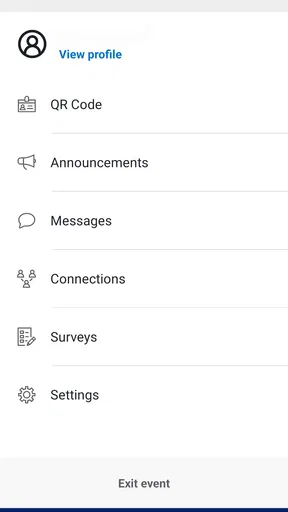
The user interface is sleek and intuitive. The design is clean, with a white and blue color scheme that’s easy on the eyes. Navigating through the app is smooth, with each feature easily accessible in a couple of taps. The loading times are quick, and I didn’t encounter any bugs or crashes during my use.
What the networking tools are best for
I see attendee profiles and messaging as a way to make a specific event less anonymous, not as a replacement for a broader professional network. A useful approach is to decide what you want from a conversation before sending a message: perhaps a brief introduction, a follow-up about a session, or a time to meet during a break. That keeps outreach purposeful and helps avoid treating every attendee profile like a contact to collect.
For a first-time attendee, the resource center can also make the app useful beyond the event day. If you miss a session, or want to revisit a presentation later, recordings and documents can provide a follow-up route. I would check the resource area after the event rather than assuming it is only an archive; it can help turn a busy day into material you can review at a calmer pace.
Where it fits among event options
Compared with a general calendar, this app is more specialized: it brings event listings, session planning, attendee connections, and event materials together in one place. A calendar remains better for household commitments and appointments that have nothing to do with a Bank of America event. Likewise, a broad networking service is more appropriate when you want ongoing professional discovery beyond a particular gathering. The app’s advantage is focus; its limitation is that its usefulness depends on attending the relevant events.
It is free, has an average rating of 3.9 from around 543 ratings, and has been installed over 100,000 times. Bank of America released it in December 2017, and version 10.21.3 (1.124.0) is the current version. Those details give a quick sense of its reach and ongoing iteration, but they do not change the practical question: will you attend an event where its schedule and attendee tools are useful? If not, there is little reason to keep it installed just in case.
Who Will Love This App?
If you’re someone who thrives on networking or loves to stay informed about the latest in the financial world, you’ll find this app incredibly useful. It’s perfect for professionals looking to broaden their horizons, students eager to learn, or anyone with a passion for finance.
However, if you’re looking for an app to manage your personal banking needs, this isn’t it. The focus here is purely on events and networking opportunities.
A household verdict
I would recommend it to the person in a household who is actually attending a Bank of America event and wants event details, a session plan, and attendee connections together. It is less compelling as a permanent shared-device app, a general calendar, or a way for the whole family to discover events. The Everyone age rating is reassuring as a content classification, but it does not remove the need for adults to guide a young attendee through account access and networking decisions.
Before the event, I would install it on the attendee’s own device if practical, confirm access, and build the agenda while there is time to compare sessions. During the event, use it for the schedule and relevant attendee conversations; afterward, look through available materials for anything worth revisiting. That workflow keeps the app in its strongest role without asking it to solve unrelated household coordination.
Final Thoughts
Overall, I think the Bank of America Events app does a fantastic job of bridging the gap between professionals and the wealth of knowledge available at these events. It’s well-designed, easy to use, and offers a plethora of features that cater to anyone interested in the financial sector.
If you’re ready to dive into the world of financial events and make some valuable connections, give this app a shot. It’s free to download, so you’ve got nothing to lose and potentially a lot to gain. Happy networking!
Pros
- User-friendly interface for easy navigation.
- Real-time event updates and notifications.
- Seamless integration with calendar apps.
- Secure access with robust authentication.
- Customizable alerts for important events.
Cons
- Limited offline functionality available.
- Requires frequent app updates.
- Occasional login delays reported.
- Some features need better explanation.
- Event search feature could be improved.
FAQs for Bank of America Events
What is the Bank of America Events app used for?
The Bank of America Events app is designed to streamline event management for attendees and organizers. It provides features like event schedules, speaker information, venue maps, and networking opportunities. Users can stay updated with real-time notifications and personalize their event experience for maximum engagement.
How do I access event information on the app?
Once you download and install the Bank of America Events app, you can access event information by logging in with your credentials. After logging in, you'll find detailed schedules, speaker bios, and venue details. The app also allows you to bookmark sessions and create a personalized itinerary.
Is the Bank of America Events app available for both Android and iOS?
Yes, the Bank of America Events app is available for both Android and iOS devices. You can download it from the Google Play Store for Android or the Apple App Store for iOS. Ensure your device meets the minimum operating system requirements for optimal performance.
Does the Bank of America Events app require an internet connection?
To access real-time updates and notifications, an internet connection is required. However, once you've downloaded the event information, you can access certain features offline. This includes saved schedules and speaker details, ensuring you stay informed even without internet access.
What security measures does the app implement to protect user data?
The Bank of America Events app prioritizes user security by implementing advanced encryption protocols to protect personal and event data. Users are required to log in securely, and regular updates ensure that the app adheres to the latest security standards, minimizing the risk of data breaches.


